MusicGPT - AI Song Generator
MusicGPTMusic & Audio
4.5171.00 Reviews
- Version
- 2.2.1
- Installs
- 100.00K
- Age Rating
- Everyone
Screenshots
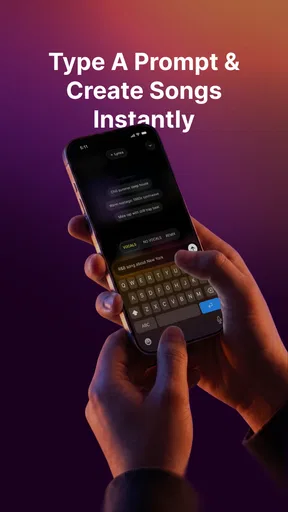
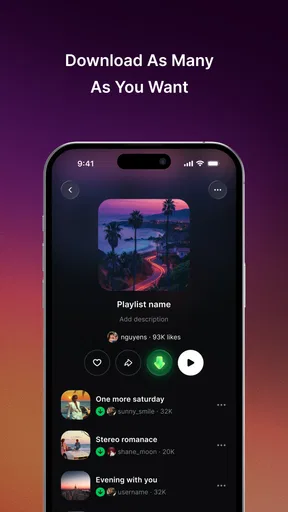
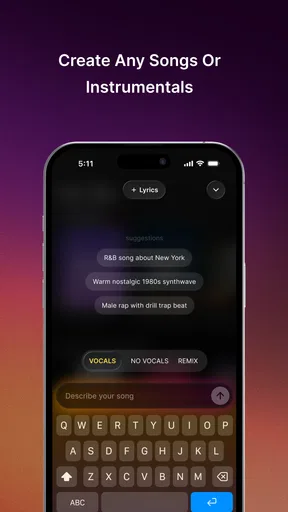
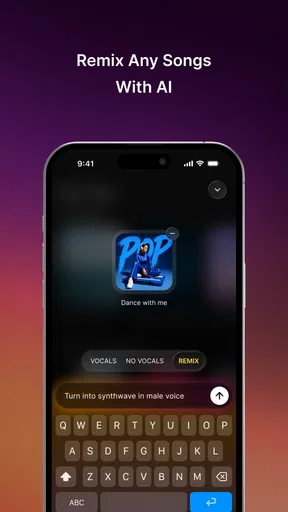
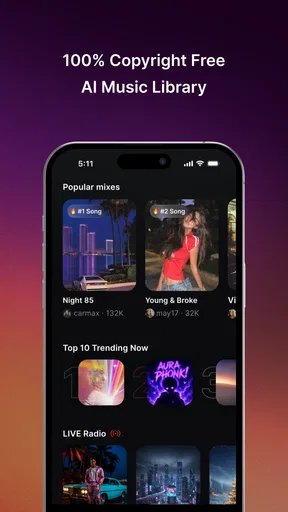
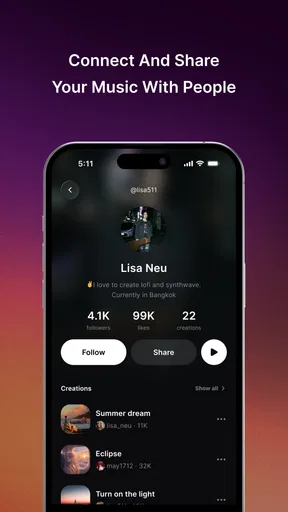
Our Review of MusicGPT - AI Song Generator
 Analysis by Appyee
I approached MusicGPT - AI Song Generator as a practical music-making tool rather than a replacement for a full recording studio. Its central appeal is simple: it uses artificial intelligence to help turn an idea into music, lyrics, or a vocal-oriented result without requiring me to begin with an instrument, a microphone, or a complicated desktop setup. That makes it especially interesting when inspiration arrives before technical skill.
In my experience, the most important capability is not merely generating a finished song. It is shortening the distance between a vague idea and something I can actually hear. A mood, theme, or rough lyrical thought can become a starting point for experimentation. The result is more useful when I treat it as a creative sketch that I can judge, reshape, and replace, rather than expecting a perfect release-ready track on the first attempt.
MusicGPT sits in the Music & Audio category and is developed by MusicGPT. It is free to install, with optional in-app purchases ranging from $3.99 to $129.99 per item. The app is rated for Everyone, so its basic positioning is approachable for casual users, students, hobbyists, and creators who want to explore AI-assisted music without committing to traditional production software.
Turning a rough idea into something audible
I find the most useful way to approach a rough musical idea is to decide what I want to learn from the first listen: whether the mood lands, whether the words feel natural, or whether the concept has enough energy to develop. That makes each generation a focused experiment rather than a shot in the dark. It also sets up the next question: how well does that creative loop hold up when I’m using the app in everyday mobile situations?
The real value is the first draft
When I use an AI music app, I am usually trying to solve a specific problem: I have an idea, but I do not yet have the musical vocabulary or time to build it manually. MusicGPT is strongest at that first stage. Instead of opening a digital audio workstation and staring at an empty timeline, I can begin with the feeling or subject I want to explore.
That changes the creative process. A conventional songwriting workflow often asks me to choose a tempo, key, chord progression, instruments, structure, and vocal approach before I know whether the idea is worth pursuing. Here, the app lets me begin from the concept itself. I can listen, react, and decide what deserves more work. The biggest benefit is reduced creative friction, not automatic musical perfection.
This distinction matters because generated music can be surprisingly useful as a reference while still needing human judgement. A chorus may suggest a better emotional direction than the original idea, while a verse may feel too generic. I can keep the useful part mentally, revise the concept, and try again. That makes the app feel closer to a rapid sketchbook than to a finished production suite.
Lyrics and voice make the idea feel more complete
The combination of AI music, lyrics, and voice gives the experience more impact than a simple beat generator. Hearing words attached to a musical idea helps me evaluate whether the theme works emotionally. A sentence that looks strong on a screen can sound awkward when placed in a song, and a plain phrase can become effective once rhythm and vocal delivery give it context.
I found this especially helpful when testing different perspectives for a song. The same subject can feel reflective, playful, dramatic, or energetic depending on the musical treatment. Rather than debating the concept in my head, I can use generated results to compare directions. That is a useful workflow for writing exercises, short-form content ideas, personal projects, and early demos.
There is also a practical advantage for people who do not want to record their own voice. An AI-assisted vocal presentation can make an idea easier to share privately or evaluate before arranging a personal performance. However, I would still treat the vocal result as part of the draft process. If the goal is a distinctive artist identity, my own performance, a hired vocalist, or a more specialized production tool will usually offer greater control and personality.
What I would prepare before opening the app
The quality of the experience depends heavily on how clearly I frame the idea. A short prompt such as “make a song” leaves too much room for a result that may be technically pleasant but creatively directionless. I get more value when I decide on the emotional purpose first: a late-night reflective track, a bright song for a travel video, a playful birthday idea, or a tense background piece for a story.
I also think about the listener and the intended length of the idea before generating anything. Is this a personal song, a social media concept, a classroom exercise, or a rough background cue? That decision helps me judge the output fairly. A simple, memorable result may be perfect for a quick video concept but disappointing to someone expecting a detailed arrangement for a complete album.
A useful habit is to create several contrasting directions instead of repeatedly asking for tiny changes to one vague idea. I might begin with a calm interpretation, then try a more energetic one, and finally explore a stripped-back mood. Comparing distinct versions reveals which part of the concept actually matters. This is more efficient than endlessly polishing a first attempt that was built on an unclear brief.
How I would use it in an everyday situation
Imagine I am preparing a short video for a family trip. I want music that feels warm and optimistic, but I do not play an instrument and do not want to spend an evening learning a full editing program. MusicGPT can help me turn that feeling into a musical starting point. I can test a few moods, listen for an appropriate energy level, and use the strongest idea as a guide for the video’s pacing.
The app is also useful for a songwriter who has a lyric fragment but cannot find the right direction. Instead of waiting for a perfect melody, I can use the fragment as a prompt and listen to possible interpretations. The generated result may not be the final song, but it can expose an unexpected rhythm or emotional angle. I can then rewrite the lyric around what I learned, or discard the result while keeping the new insight.
For a student, the same process can support a music or media assignment. The student can explore how a theme changes when expressed through different musical moods. For a small content creator, it can provide a fast concept to discuss with an editor or collaborator. In both cases, the value comes from making an abstract idea easier to hear and discuss.
Where the app fits beside traditional alternatives
Compared with a digital audio workstation, MusicGPT is much faster to approach because it does not begin by asking me to assemble every musical component manually. A workstation remains the better choice when I need precise editing, detailed mixing, instrument control, or a repeatable professional production process. It rewards patience and technical knowledge in a way an AI generator cannot fully replace.
Compared with a conventional lyrics app, MusicGPT has a broader creative loop because the words can be considered alongside music and voice. A lyrics-only tool may be preferable when I already have a melody and want tight control over rhyme, syllable count, or personal phrasing. MusicGPT is more useful when the relationship between words and musical atmosphere is still undecided.
Compared with stock music libraries, the appeal is flexibility. A library is often faster when I need a dependable, already-finished track with a known mood. MusicGPT is more exploratory: I can search for an idea by describing it rather than browsing through many existing pieces. That convenience comes with a trade-off, because a generated result may require more evaluation before it feels suitable for a public project.
The trade-off between speed and control
The app’s greatest strength can also be its main limitation. By handling much of the musical decision-making automatically, it saves time, but it also reduces the amount of control I have over every detail. If I want to specify an exact chord change, instrument entrance, vocal inflection, or bar-by-bar arrangement, a specialized production environment is likely to serve me better.
There is a second trade-off involving originality. AI-generated ideas can help me escape a blank page, but they may not automatically carry the personal history or unusual detail that makes a song feel unmistakably mine. I get better results when I add my own subject matter, images, wording, and editorial judgement. The app should start the conversation, not speak for me from beginning to end.
Cost is another point to consider. The app itself is free, which makes trying the basic experience relatively easy, but optional purchases can reach $129.99 per item. I would explore the free experience first and only consider spending after deciding how often the workflow genuinely helps me. Someone who generates music once for curiosity may have a very different view of value from a creator who uses it repeatedly during ideation.
I would also avoid assuming that every generated result is ready for immediate publication. Before using anything in a public project, I would review the app’s current usage terms and make sure the intended use is appropriate. That is not unique to MusicGPT; it is a sensible habit with any service that creates music, lyrics, or voice through automation.
Small workflow choices that improve the experience
My first practical tip is to separate idea generation from selection. I would not judge the first result too harshly, and I would not keep regenerating without a clear reason. After each attempt, I would write down one useful element and one problem. For example, the mood may work while the lyric theme feels too broad. This turns casual experimentation into a repeatable creative process.
My second tip is to use the voice element as a diagnostic tool, not just decoration. Listening to lyrics performed aloud can reveal awkward phrasing, repeated words, or a chorus that lacks a memorable shape. If a line sounds unnatural, I would revise the wording before changing the entire musical direction. This can save time because the problem may be in the text rather than the generation itself.
My third tip is to keep a clear boundary between a demo and a deliverable. I would use MusicGPT to discover atmosphere, structure, and lyrical possibilities, then decide whether the final project needs another tool. This prevents disappointment and makes the app more valuable: it does not have to do every job if it does the early creative job quickly and well.
A fourth useful approach is to generate with a listener in mind. I would ask whether the result is meant to support a visual, communicate a message, or simply create a personal mood. The same song can succeed in one setting and fail in another. Judging it against a real purpose is more helpful than asking whether it sounds universally impressive.
Who will get the most from it
MusicGPT is a strong fit for curious beginners who want to make music without first learning a large set of production tools. It is also appealing to writers who want to hear lyrics in a musical context, creators who need quick concept music, and experienced musicians who want a source of prompts when their usual workflow feels predictable.
I can also see value for people who think in scenes rather than technical musical terms. If I know that I want something intimate, hopeful, tense, or celebratory, an AI-first interface may feel more natural than choosing instruments and effects manually. The app gives those users a way to communicate an intention before they understand the mechanics behind it.
On the other hand, I would not make it my first recommendation for someone who already needs detailed production control. A composer working with exact notation, a producer building a carefully mixed release, or a vocalist shaping a highly personal performance may find the app too indirect. In those cases, traditional recording and editing software offers more predictable control, even if it takes longer.
It is also not ideal for someone who wants to avoid making creative decisions. The app can generate possibilities, but I still have to choose the theme, recognize what works, edit weak ideas, and decide whether the result fits its purpose. If I expect one tap to produce a distinctive finished song every time, the experience will probably feel less satisfying.
My view after using it as a creative partner
MusicGPT works best when I treat it as an idea accelerator. Its ability to bring together music, lyrics, and voice makes a rough concept easier to hear, and that can be genuinely motivating. I do not need to wait until I have the perfect melody or production setup before testing an idea.
The app is free, carries an Everyone age rating, and has reached over 100 thousand installs with a 4.5 average from around 18 thousand ratings, which suggests that its approachable concept has found an audience. It was released on February 6, 2026, and version 2.2.1 requires Android 10 or newer. Those details make it a current option for compatible Android users who want to experiment with AI-assisted songwriting.
My recommendation is straightforward: try it if your main obstacle is getting from an empty page to a listenable draft. Start with a specific mood or use case, compare a few clearly different directions, and treat the strongest result as material to refine. If you need exact arrangement control or a final professional mix, pair it with a more specialized tool instead of expecting it to replace one.
For me, the lasting appeal is the way it makes musical thinking more immediate. A half-formed idea becomes something I can hear, question, and improve. That is a modest promise compared with producing an entire finished record, but it is a useful one—and for the right creator, it can be the difference between an idea being forgotten and an idea finally getting a beginning.
Verdict
Strengths of MusicGPT - AI Song Generator
- Creates original songs from simple text prompts
- Offers multiple genres and moods for creative experimentation
- Useful for quickly generating ideas, hooks, and demos
- Simple interface suitable for beginners
- Can inspire songwriting when you are stuck
Limitations of MusicGPT - AI Song Generator
- Generated vocals may sound artificial or inconsistent
- Results can vary greatly between prompts
- Free usage may include limits or require credits
- Songs may need editing before sounding professionally polished
- Review licensing terms before using tracks commercially
Similar Picks in This Category
View All
YouTube Music
Google LLC4.4

Samsung Music
Samsung Electronics Co., Ltd.3.8

Spotify: Music and Podcasts
Spotify AB4.3

JioSaavn - Music & Podcasts
Saavn Media Limited4.3

Lark Player:Music Player & MP3
Lark Player Studio - Music, MP3 & Video Player4.6

StarMaker: Sing Karaoke Songs
SKYWORK AI PTE. LTD.4.3
Frequently Asked Questions
What is MusicGPT - AI Song Generator, and how does it work?
MusicGPT - AI Song Generator is an app designed to create original music from written prompts. You can describe a genre, mood, theme, instruments, or song idea, and the AI generates a musical result based on that description. The experience is aimed at beginners who want to experiment with songwriting, background music, demos, or creative concepts without needing advanced music-production skills.
Can MusicGPT create complete songs with vocals and lyrics?
The app’s capabilities may depend on the version, subscription plan, and available generation modes. Some features can focus on instrumental tracks, while others may support lyrics, vocal-style elements, or more complete song arrangements. Before downloading, check the current App Store or Google Play listing carefully, because AI music features and supported output formats can change through updates.
Is MusicGPT - AI Song Generator free to use?
MusicGPT may offer free access with limitations, such as a restricted number of generations, slower processing, watermarked results, advertisements, or limited export options. Additional credits, higher-quality audio, longer tracks, or commercial-use rights may require an in-app purchase or subscription. Review the pricing screen and trial terms before generating extensively, especially if automatic renewal is enabled.
Can I use songs created with MusicGPT commercially or upload them online?
Commercial usage depends on the app’s current terms, the subscription level, and the rights associated with the generated content. AI-generated music may have restrictions involving monetization, advertising, streaming platforms, client projects, or copyrighted prompts and samples. If you plan to publish tracks on YouTube, TikTok, Spotify, or elsewhere, read the license agreement carefully and keep records of your plan and export permissions.
Does MusicGPT require an internet connection, and what should I expect regarding privacy?
Because music generation generally takes place on remote servers, MusicGPT is likely to require an internet connection for creating and processing tracks. Your prompts, account details, and possibly uploaded material may be transmitted to the service. Before using the app, review its privacy policy to understand data storage, AI-training practices, third-party services, account deletion, and whether your prompts or generated songs are retained.
